
How to Interact with Ronin Mainnet Using Conduit RPC
Learn how to set up Conduit RPC, connect to Ronin Mainnet, and make your first RPC request. This guide covers API key setup, endpoints, access controls, and usage metrics.

If you're building on Ronin and need a reliable, fast way to interact with the network, RPC (Remote Procedure Call) is the foundation of everything, from reading on-chain data to submitting transactions. In this guide, we'll walk through how to get set up with Conduit's RPC product on Ronin Mainnet, make your first RPC request, and explore some of the tools available to help you manage and monitor your usage.
By the end of this guide, you'll know how to:
- Create an API key on the Conduit dashboard
- Find and copy your Ronin RPC endpoint
- Make a live RPC request using cURL
- Set up access controls to secure your key
- Monitor your usage through the Metrics dashboard
Let's get started!
Getting Started
Before you can make your first RPC request, you'll need a Conduit account and an API key. Here's how to get set up.
Step 1: Create Your Account
Head over to app.conduit.xyz and sign up for a free account. Once you're in, you'll land on the main dashboard.
Step 2: Create a New API Key
From the left-hand sidebar, navigate to the Nodes section. This is where all your RPC configuration lives.
Once you're on the Nodes overview page, click on Create new API key. You'll be prompted to give your key a name. Enter the preferred name for your API key and click on “Create”.
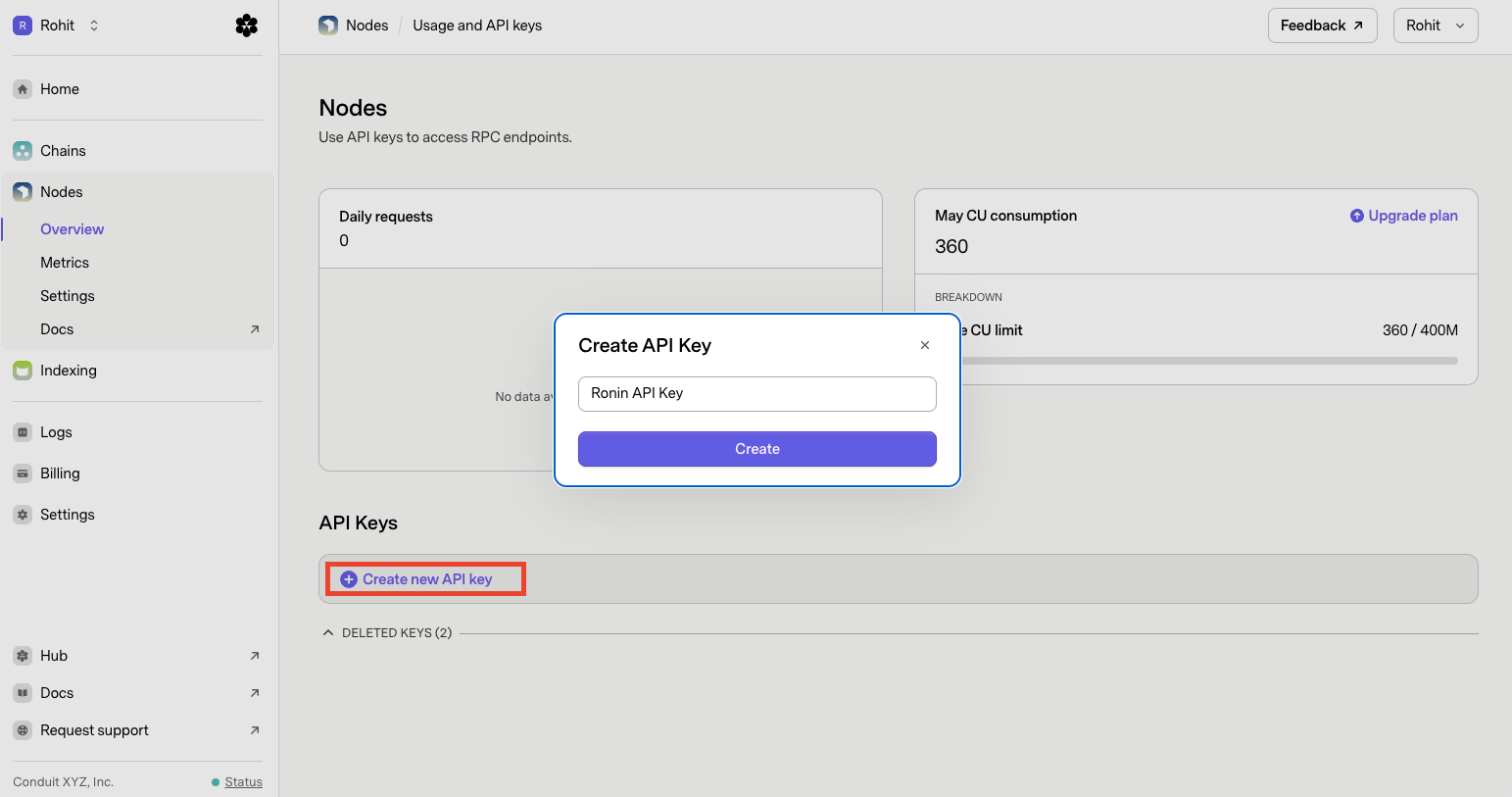
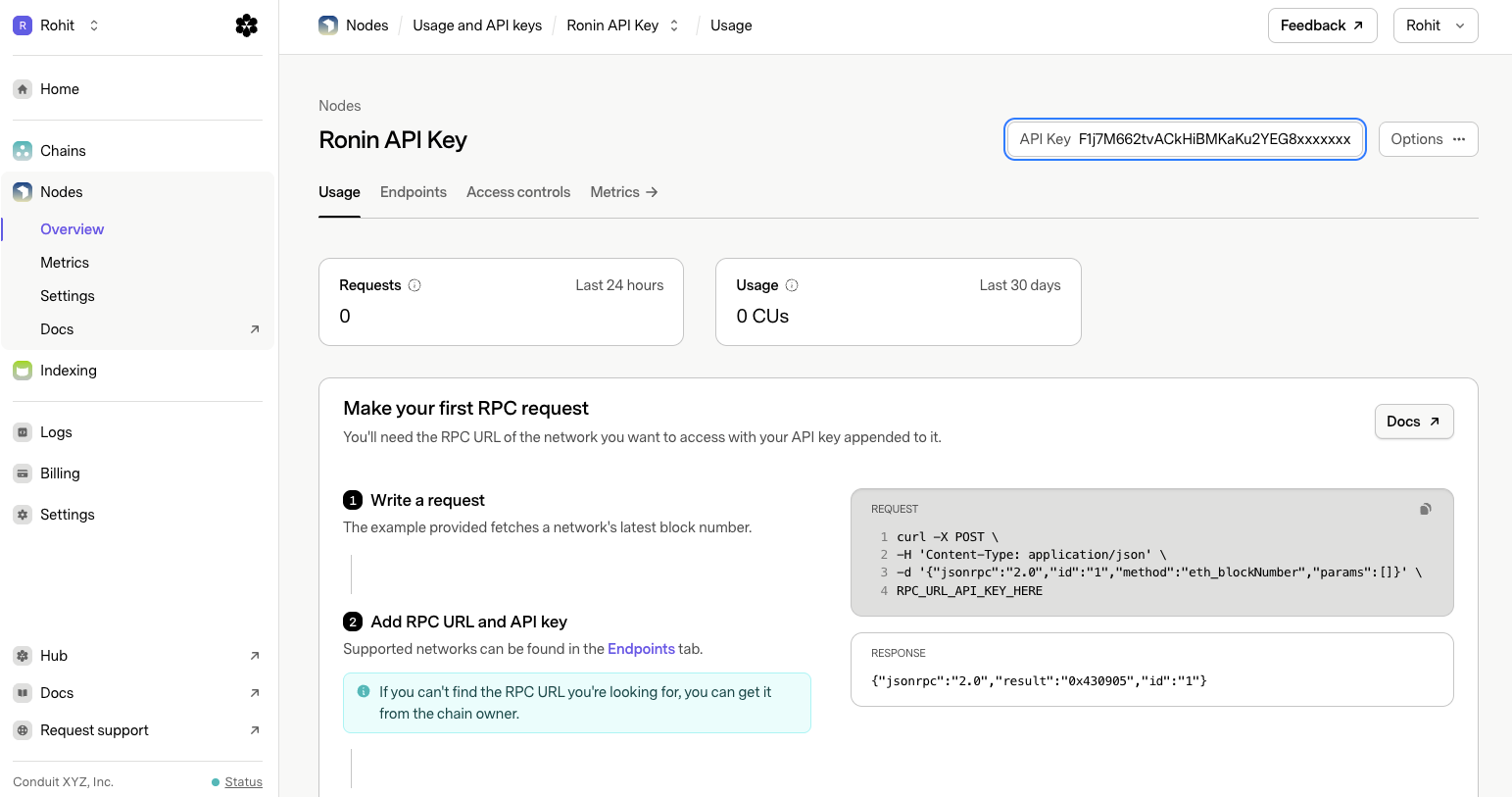
Once the key is created, you'll see it appear in the top right corner of the dashboard. You will be able to copy this, so make a note of this API key, as you'll need it when making RPC requests.
💡 Important: Treat your API key like a password. Don't commit it to version control or share it publicly.
Making Your First RPC Request
With your API key in hand, the next step is to grab your RPC endpoint URL and fire off your first request.
Getting Your RPC Endpoint URL
Still within the Nodes section of the Conduit dashboard, click on the Endpoints tab at the top of the page. From there, use the search bar to find the Ronin network.
Once you've located it, copy the RPC URL. It will look something like this:
https://rpc-ronin-mainnet-bfz9fadqzl.t.conduit.xyz

//Please pull the latest RPC URL from the Endpoints tab
You're now ready to make your first request.
Using cURL to Make an RPC Request
Conduit RPC follows the standard Ethereum JSON-RPC specification. Every request is a POST call with a JSON body that includes four fields:
| Field | Description | Example |
|---|---|---|
jsonrpc |
Protocol version | "2.0" |
method |
The RPC method you want to call | "eth_blockNumber" |
params |
Arguments for the method | [] |
id |
An identifier for the request | "1" |
Here's what the base cURL command looks like:
curl -s https://[YOUR_RPC_URL]/[YOUR_API_KEY] \\
  -X POST \\
  -H 'Content-Type: application/json' \\
  -d '{"jsonrpc":"2.0","id":"1","method":"[METHOD_NAME]","params":[]}'
To run this, replace [YOUR_RPC_URL] with the Ronin endpoint you copied earlier, [YOUR_API_KEY] with your key from the dashboard, and [METHOD_NAME] with the method you want to call.
Example: Get the Latest Block Number
Let's try something simple: fetching the latest block number on Ronin Mainnet using eth_blockNumber.
Replace the placeholders with your actual values and run the code.
Sample code:
curl -s https://rpc-ronin-mainnet-bfz9fadqzl.t.conduit.xyz/F1j7M662tvACkHiBMKaKu2YEG8xxxxxxx \
  -X POST \
  -H 'Content-Type: application/json' \
  -d '{"jsonrpc":"2.0","id":"1","
You should get back a response that looks like this:
{
  "jsonrpc": "2.0",
  "id": "1",
  "result": "0x430905"
}
The result field contains the latest block number in hexadecimal format. To convert it to decimal, you can run echo $((16#430905)) in your terminal, which will give you the block number as a regular number.
You can swap out `eth_blockNumber for other standard methods depending on what you need. For example, eth_getBalance to check an address balance, eth_gasPrice for the current gas price, or eth_getTransactionCount to get the nonce for a given address.
You can find the complete list of supported RPC methods here.
Access Controls
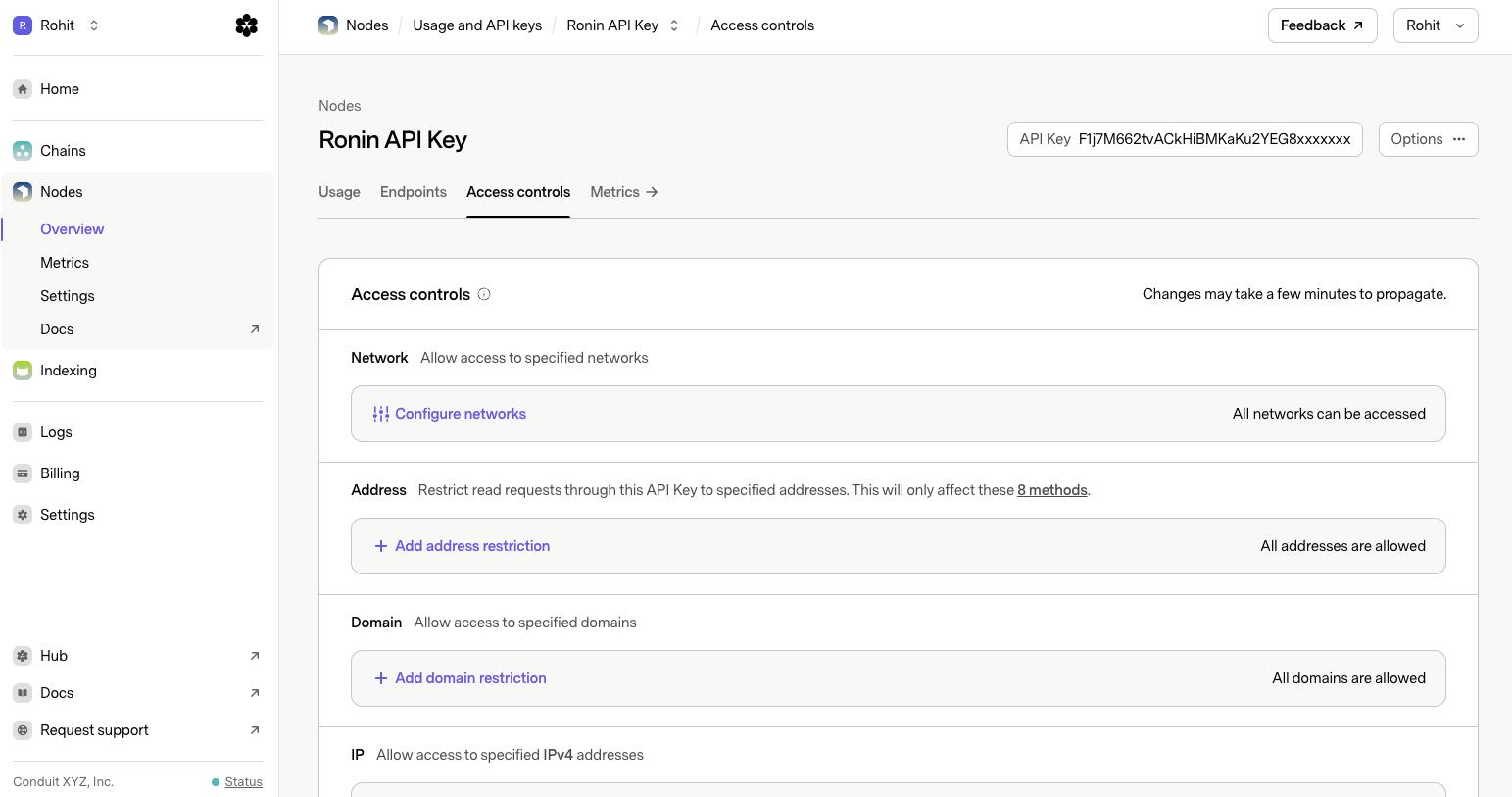
Once you start using your API key in a real project, it's a good idea to lock it down. Conduit gives you several ways to restrict how and where your key can be used, all configurable from the “Access controls” tab within the Nodes section.
⚠️ Important:
Once you add any restriction within a category, the system switches to a deny-all-except-allowed model for that category. This means anything not explicitly listed will be blocked. Keep this in mind when adding your first restriction.
Here's a breakdown of each control:
Network
Restricts which blockchain networks your API key can be used to access. By default, all networks are accessible. If you're only building on Ronin, you can limit your key to just that network to reduce unnecessary exposure.
Address
Limits read requests through this API key to specific wallet addresses. This is useful if you want your key to only serve data for a known set of addresses. Note that this only affects the 8 specific read methods that accept an address parameter.
Domain
Restricts which domains are allowed to make requests using this key. If you're using the RPC URL in a frontend app, adding your domain here ensures no one else can use your key from a different origin. Wildcard patterns are supported (e.g., *.yourdomain.com), so you can cover all subdomains with a single entry.
IP
Allows you to whitelist specific IPv4 addresses. This is particularly useful for server-side applications where you know the IP of your backend. Only requests from that IP will be accepted. CIDR notation is also supported (e.g., 10.10.0.0/16), making it easy to whitelist an entire IP range.
Method
Lets you control which specific JSON-RPC methods can be called using this key. If your application only needs eth_blockNumber and eth_call, you can block everything else, limiting the potential blast radius if the key is ever exposed.
💡 Note: These restrictions can be combined. For example, you could limit a key to a specific domain, a set of IP addresses, and only a handful of methods, giving you fine-grained control over how it gets used.
Changes to access controls may take a few minutes to propagate.
Metrics
Once you start making requests, you can track everything from the “Metrics” tab in the Nodes section. The dashboard gives you a real-time view into how your API key is being used, and it's a great way to debug issues or understand your traffic patterns.
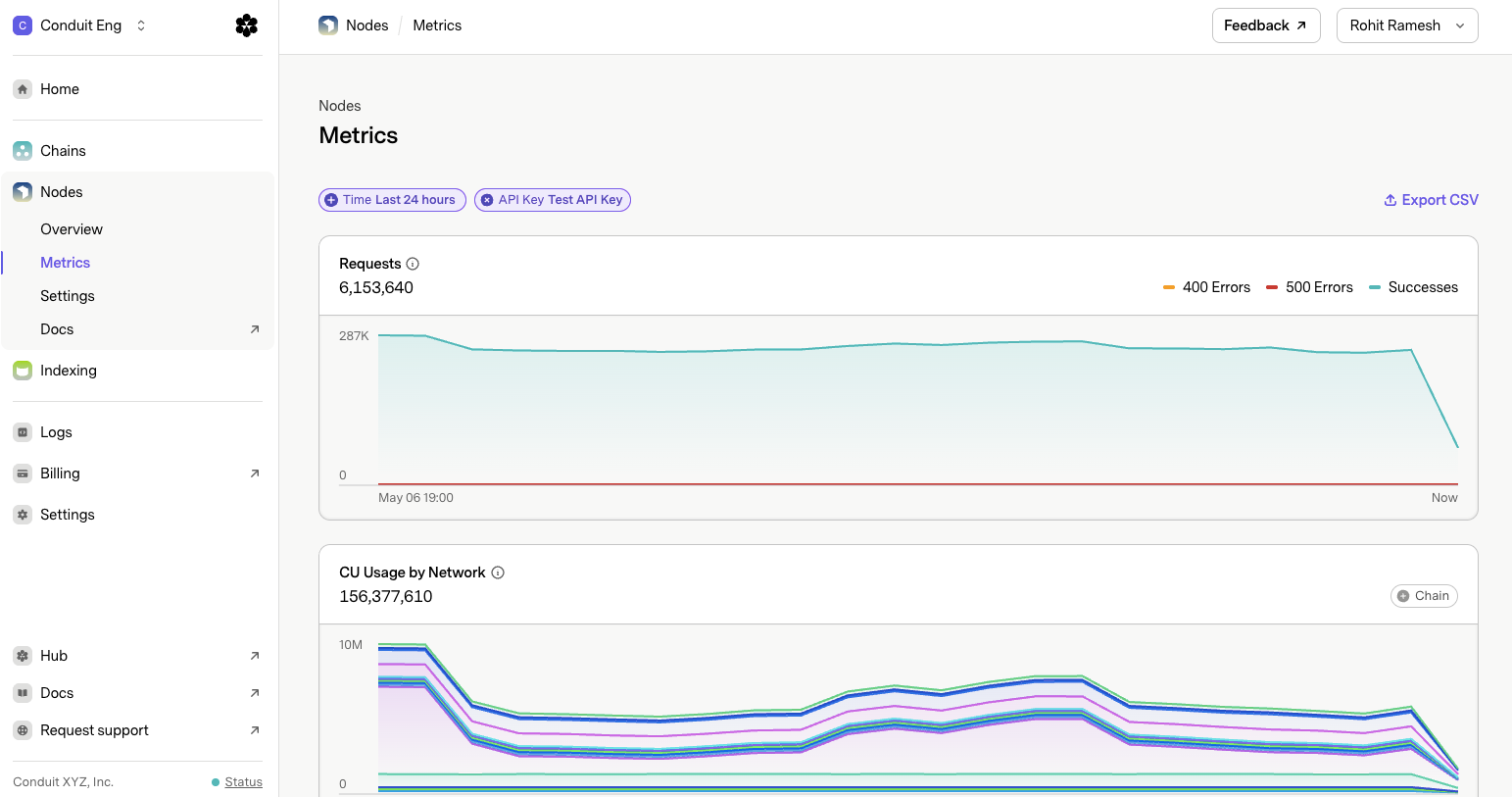
💡 Note: If you've just created your API key and the dashboard is showing no data, that's expected, the data will start appearing once requests are made using that key.
Here's a quick overview of the key metrics available:
Requests
The total number of RPC requests made during the selected time period. You can filter by time range and API key to narrow down your view.
CU Usage by Network
Shows how many compute units (CUs) have been consumed, broken down by blockchain network. This is useful if you're using a single key across multiple networks and want to understand where your usage is coming from.
Response Time
The average time it takes for the RPC node to respond to your requests. Lower is better. If you're seeing high latency, this can help you identify if it's a network-specific issue.
Success Rate
The percentage of requests that returned a successful response. A drop here is usually a signal that something is wrong, either with the request format, the method being called, or the parameters being passed.
Methods
A breakdown of which RPC methods are being called most frequently, along with their request count and CU cost. This is handy for optimizing your usage and understanding which operations are the most expensive.
Wrapping Up
In this guide, we walked through the full flow of getting up and running with Conduit RPC on Ronin Mainnet, from creating your API key and finding your endpoint, to making your first live RPC request, locking down your key with access controls, and monitoring your usage through the Metrics dashboard.
Conduit's RPC infrastructure is built to scale with you, whether you're prototyping a new idea or running a production application that needs reliable, low-latency access to Ronin.
Start Building on Ronin with Conduit
To support the Ronin ecosystem, Conduit is offering 20% off RPC services for the first year versus your current provider, so you get Ronin's performance and reliability at a lower cost.
Interested? Reach out to [email protected] to learn more and get started.
Need Help?
If you run into any issues or want to dig deeper into what's possible with Conduit RPC, the Conduit documentation is a great place to start. You'll find detailed explanations of all supported methods, billing details, and advanced configuration options.